
Smart Receipts: Expenses & Tax
REACTIVE APPS CORP.Business
4.52.50K Reviews
- Version
- Varies With Device
- Installs
- 1.00M
- Age Rating
- Everyone
Screenshots
Our Review of Smart Receipts: Expenses & Tax
 Analysis by Appyee
Paper receipts create two kinds of trouble: they are easy to lose, and they rarely arrive when I need to explain a purchase. Smart Receipts: Expenses & Tax is built around a practical alternative: capture the receipt, keep the expense organized, and have a record to work from later. I find that approach most useful for people who need a steady habit rather than a complicated accounting system.
Making the first capture easier to read
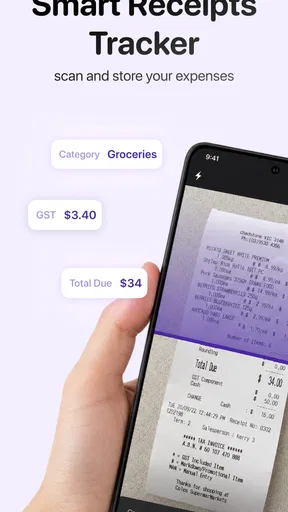
The first useful test is not whether an app can recognize a perfect receipt, but whether its process is manageable when I am tired, in a hurry, or dealing with a long slip of paper. Smart Receipts lets me take a receipt photo and then works to identify the expense details. The AI-powered scanning angle makes that initial capture appealing, but I would still treat recognition as a head start, not as a final check. A quick review before filing can prevent a small reading error from becoming a confusing report later.
That distinction matters for readability too. A digital image is easier to retrieve than a receipt buried in a bag, but a photo of tiny, faint print does not magically become easy to inspect. I get better results by laying the receipt flat, keeping the whole slip in frame, and checking the captured image before moving on. If the paper is faded, creased, or poorly lit, the original may still need careful manual entry. The app reduces routine handling; it does not remove the need to verify what matters.
A straightforward route through expense tracking
Setting up Smart Receipts: Expenses & Tax is a breeze. Just download it from your favorite app store, and you're ready to roll. The user interface is clean and intuitive, so you won't find yourself lost in a maze of confusing options. It’s like having a personal accountant that's easy to chat with.
The app lets you snap photos of your receipts with your phone's camera. This means no more stuffing paper receipts in your wallet or purse. You just take a picture, and the app does the rest. It’s as simple as taking a selfie, but with more financial benefits!
Useful for people whose expenses need context
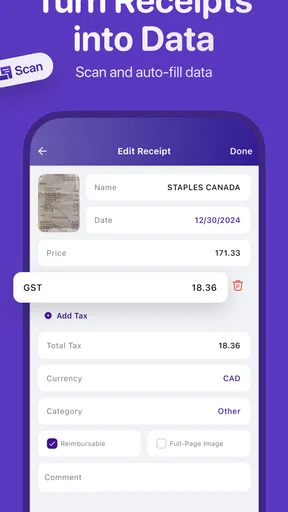
Automatic categorization is a helpful starting point because it can sort a receipt into a likely expense type without making me begin from a blank screen. I would not rely on that guess without checking it, especially when the same kind of purchase could be personal or business-related. A restaurant receipt, for instance, does not explain who attended or why the meal was work-related. Adding context while the purchase is still fresh is a small step that can save a lot of guesswork later.
That makes the app a better fit for freelancers, employees who submit expenses, and travelers who need a record of purchases than for someone who only wants a rough monthly spending total. For a simple household budget, a bank app or a basic spreadsheet may be quicker because it already shows card transactions and does not require photographing each slip. Smart Receipts earns its place when the receipt itself matters, not merely the amount that left an account.
Features That Stand Out
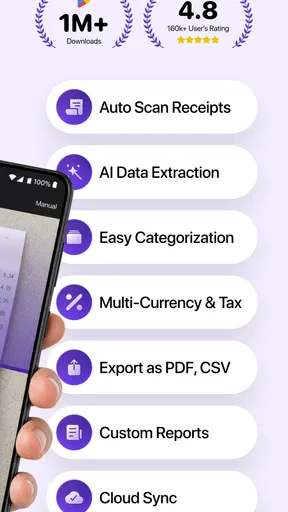
One of the coolest features is the automatic categorization. Once you upload a receipt, the app tries to figure out what kind of expense it is. Is it a business lunch? A travel expense? It’s like magic when it gets it right, and yes, it often does!
Another handy feature is the conversion of currencies. If you're a frequent traveler, this feature is a lifesaver. You can upload a receipt in euros, and it'll convert it to dollars (or whichever currency you prefer). No more headaches trying to figure out the exchange rate.
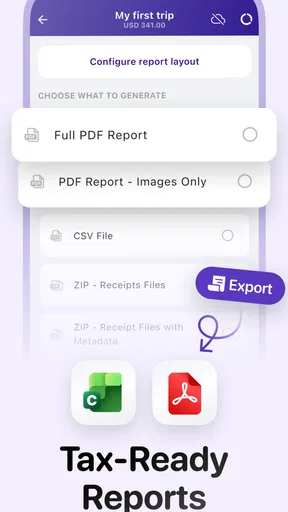
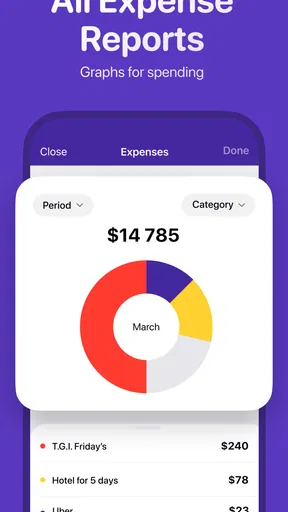
- Customizable Reports: Need to create a report for your boss or accountant? The app lets you generate professional-looking reports with just a few taps.
- Cloud Sync: Worried about losing your data? You can sync everything to the cloud, ensuring your financial history is safe and sound.
- Export Options: Whether it's PDF, CSV, or ZIP, you can export your reports in various formats.
A repeatable routine for busy days and trips
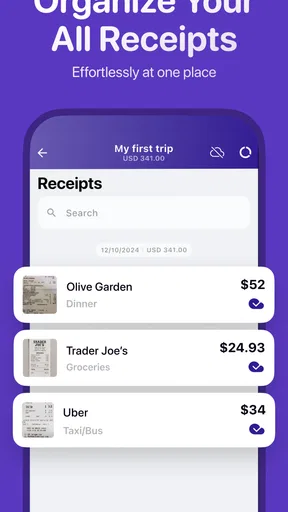
Here is the everyday scenario where I see the strongest payoff: I pay for a work-related taxi during a packed day, take the receipt photo before leaving the car, and check the details while the trip is still easy to remember. If the expense needs an explanation, I add that context then rather than trying to reconstruct it weeks later. At the end of the week, I can review the entries and make a report instead of sorting a stack of paper at month-end.
For travel, I would use the same routine but keep local-currency receipts together and review converted amounts with the originals still in view. Currency conversion makes comparison easier; it should not replace checking what was actually charged. For a team or employer with a specific submission process, I would also confirm that the exported report suits that process before relying on it for a deadline. The available PDF, CSV, and ZIP formats give useful flexibility, but they do not guarantee that every recipient wants the same format.
One non-obvious benefit of entering expenses close to the purchase is that categorization becomes easier to correct. A vague merchant name might be obvious to me on the day, but not after several weeks. My practical tip is to build a short review into an existing habit—after lunch, at the hotel, or when clearing my bag—rather than trying to scan everything in one long session. That also makes it easier to notice a missed receipt while there is still a chance to retrieve it.
Customization helps, but consistency matters
The ability to make categories fit my own work can be more useful than adding a long list of labels. I would start with a few categories that match the way expenses are actually reviewed, then keep their meanings consistent. If every month uses different labels, reports become harder to compare even if each receipt is perfectly captured. Customization is most valuable when it makes later decisions clearer, not simply when it creates more options.
Reports and exports are also a handoff, not a substitute for checking the underlying records. Before sending one to a manager or accountant, I would scan for uncategorized items, duplicates, and receipts whose amounts need correction. That brief pass is especially worthwhile if automatic recognition was involved. The app can help assemble the material, while the person submitting it remains responsible for whether the record makes sense.
Who benefits from the workflow—and who may not
Smart Receipts is a business app from REACTIVE APPS CORP. It is free to install, has an Everyone age rating, and has been available since Oct 11, 2011. Its 4.5 average across around 9,800 ratings and more than a million installs suggest that many people use it, though popularity alone cannot tell me whether its workflow fits a particular job. In-app purchases range from $2.99 to $99.99 per item, so I would check the current options before depending on paid capabilities for a regular process.
I would recommend trying it if receipts are part of your reimbursement, tax-preparation, or travel routine and you are willing to review the captured details. Someone who handles only a few purchases and never needs the paper proof may find a notes app or spreadsheet less work. Likewise, people who expect every receipt to scan perfectly with no corrections may be frustrated: faded print and crumpled paper remain real obstacles, and manual fixes take time.
Readability, motor effort, and different settings
For readability, the clearest benefit is having receipts and reports in one digital workflow instead of searching through physical piles. The capture step still asks me to aim the phone, frame the entire receipt, and inspect what was saved. That can be fiddly for a long slip or in a crowded place. I would take the photo somewhere stable when possible, rather than trying to do it while walking or balancing bags. That is a practical accommodation, not a claim that the app removes visual or motor barriers.
People who find precise tapping, camera alignment, or prolonged screen review difficult may need more time or another person’s help with parts of the process. A paper envelope can be a sensible temporary option if taking a photo is uncomfortable, followed by a short capture session later in a calmer setting. Bright sunlight, dim restaurants, and noisy travel situations can also make careful checking harder. The app is most useful when I can pause long enough to confirm the amount and category, not when I am forced to rush.
What to expect before relying on it
The basic version is free, while some advanced capabilities involve in-app purchases. That makes it reasonable to begin with a small trial workflow before paying: capture a few representative receipts, check whether the recognition and organization suit the way you work, then decide whether additional options solve a real need. I would avoid building a tax or reimbursement routine around a feature until I know it is available in the plan I intend to use.
Cloud sync can make records accessible beyond a single device, and exports give a way to pass information onward. I would still keep my own expectations grounded: a report is only as reliable as the entries inside it, and scanning does not make a receipt legible if its print is damaged. For important expenses, I would retain the original paper until I am confident the digital record is complete and acceptable for the person or process that needs it.
Getting Started with Smart Receipts
Setting up Smart Receipts is a breeze. Just download it from your favorite app store, and you're ready to roll. The user interface is clean and intuitive, so you won't find yourself lost in a maze of confusing options. It’s like having a personal accountant that's easy to chat with.
The app lets you snap photos of your receipts with your phone's camera. This means no more stuffing paper receipts in your wallet or purse. You just take a picture, and the app does the rest. It’s as simple as taking a selfie, but with more financial benefits!
Features That Stand Out
One of the coolest features is the automatic categorization. Once you upload a receipt, the app tries to figure out what kind of expense it is. Is it a business lunch? A travel expense? It’s like magic when it gets it right, and yes, it often does!
Another handy feature is the conversion of currencies. If you're a frequent traveler, this feature is a lifesaver. You can upload a receipt in euros, and it'll convert it to dollars (or whichever currency you prefer). No more headaches trying to figure out the exchange rate.
- Customizable Reports: Need to create a report for your boss or accountant? The app lets you generate professional-looking reports with just a few taps.
- Cloud Sync: Worried about losing your data? You can sync everything to the cloud, ensuring your financial history is safe and sound.
- Export Options: Whether it's PDF, CSV, or ZIP, you can export your reports in various formats.
Why You’ll Love It
Now, let’s talk about why this app is a game-changer. If you're like me and hate the nitty-gritty of tax season, this app takes the edge off. It keeps everything organized and accessible, so come tax time, you’re not pulling your hair out.
Plus, the app is customizable. You can create categories that suit your personal needs. If you’re someone who likes to track every coffee purchase separately from other expenses, go for it! It’s all about making it work for you.
Where It Could Improve
Okay, so not everything is sunshine and rainbows. Occasionally, the app struggles with reading certain receipts, especially if they're crumpled or faded. But hey, it’s nothing a little manual input can’t fix. It's still way easier than organizing a pile of paper receipts!
Also, while the basic version is free, some of the more advanced features require a subscription. It’s worth it if you have complex financial needs, but something to keep in mind if you're budget-conscious.
The Final Verdict
So, is Smart Receipts worth downloading? Absolutely. It’s a solid tool for anyone looking to make expense tracking and tax preparation less of a chore. While it’s not perfect, the benefits far outweigh the minor hiccups.
If you’re ready to wave goodbye to the mess of receipts in your life, give it a try. You’ll find the app does a lot of the heavy lifting for you, leaving you more time to focus on the things you love. And who doesn’t want that?
Verdict
Strengths of Smart Receipts: Expenses & Tax
- Easy to navigate interface
- Customizable receipt categories
- Supports multiple currencies
- Generates detailed reports
- Exports data to PDF and CSV
Limitations of Smart Receipts: Expenses & Tax
- Limited free version features
- Occasional sync issues
- Ads in the free version
- No real-time collaboration
- Requires manual data entry
Similar Picks in This Category
View All
LinkedIn: Community & Network
LinkedIn3.8

Zoom Workplace
zoom.com4.1

Microsoft Teams
Microsoft Corporation4.6

Meta Business Suite
Meta Platforms, Inc.4.6

Webex Meetings
Cisco Systems, Inc.4.5

TeamViewer Remote Control
TeamViewer4.4
Frequently Asked Questions
What features does Smart Receipts offer for managing expenses?
Smart Receipts provides a comprehensive suite of features designed to simplify expense management. It allows users to capture receipt images, categorize expenses, and generate detailed reports. The app supports multiple currencies and integrates with cloud services like Dropbox. Additionally, it offers PDF and CSV export options to streamline financial reporting and tax preparation.
Is Smart Receipts user-friendly for beginners?
Yes, Smart Receipts is designed with user-friendliness in mind, making it accessible for beginners. The interface is intuitive, with easy navigation through its features. The app provides helpful tutorials and guides, ensuring users can quickly learn to manage their expenses efficiently, even if they are new to digital expense tracking.
Can Smart Receipts be used for both personal and business expenses?
Absolutely, Smart Receipts is versatile enough to handle both personal and business expenses. Users can create separate profiles or categories to distinguish between personal and professional expenditures. This flexibility makes it suitable for freelancers, business travelers, and anyone needing to keep detailed records of their financial activities.
Does Smart Receipts offer integration with other financial tools?
Smart Receipts integrates smoothly with various financial tools and services. It supports exports to accounting software like QuickBooks and Xero, enabling seamless transitions from expense tracking to accounting. Integration with cloud services such as Dropbox allows for easy data backup and sharing, enhancing the app’s functionality and convenience.
Is there a cost for using Smart Receipts, and what are the pricing options?
Smart Receipts offers both free and premium versions. The free version includes basic features, while the premium version unlocks advanced capabilities such as custom reports, ad-free usage, and automatic cloud backups. Pricing for the premium version is competitive, with options for monthly or annual subscriptions, catering to various user needs and budgets.
